浏览器小书签
浏览器本身其实就是个很好的脚本执行器,但如果总是需要打开控制台,然后复制粘贴代码运行的话很麻烦,虽然可以做成网页,在网页中运行代码,但是是时候不太需要专门打开一个网页去运行脚本。
实际上,浏览器书签栏的书签能够保存 URL 外,还可以保存 JS 代码。最早我是在 Evernote 的剪藏小书签中遇到它的,它实际上就是运行了一段 JS 代码将当前的 windows.location 发送给 Evernote 服务器。
需要注意的两点是:
- 必须在网页中运行,在浏览器 config 页面中是不起效果的;
- 部分网页可能采用了某些技术使你没法运行 JavaScript;
- JavaScirpt 运行的上下文为当前网页,也就是说你可以操作当前网页的 DOM 元素。
格式
下面是生成时间戳字符串的 JS 代码:
javascript:(function() {
  const now = new Date();
  const year = now.getFullYear().toString().substr(-2);
  const month = ('0' + (now.getMonth() + 1)).slice(-2);
  const day = ('0' + now.getDate()).slice(-2);
  const hours = ('0' + now.getHours()).slice(-2);
  const minutes = ('0' + now.getMinutes()).slice(-2);
  const seconds = ('0' + now.getSeconds()).slice(-2);
  const code = year + month + day + hours + minutes + seconds;
  const el = document.createElement('textarea');
  el.value = code;
  el.setAttribute('readonly', '');
  el.style.position = 'absolute';
  el.style.left = '-9999px';
  document.body.appendChild(el);
  el.select();
  document.execCommand('copy');
  document.body.removeChild(el);
  alert('已将时间字符串复制到剪贴板中:' + code);
})();
创建一个书签:
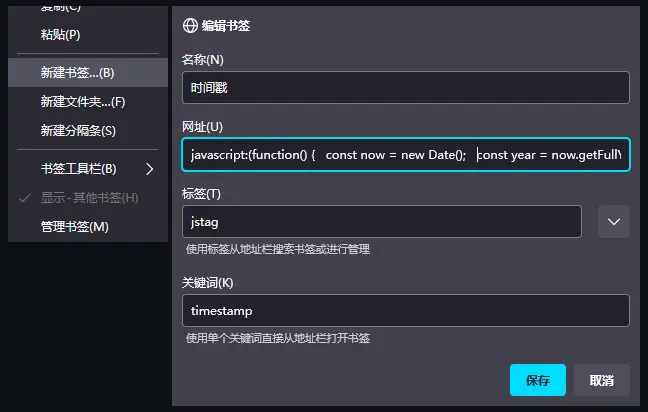
点击后运行,就能从剪贴板获取时间戳了。